Hello fellow PowerShell enthusiasts. I have been missing for a few months with a new child that has occupied most of my extra time! I look forward to get back in the blogging gear soon.
I just wanted to send out a note that we are hosting our first kick off meeting for the Boston PowerShell User Group at the Microsoft MTC in Kendall Square Cambridge, MA. Here are the two topics that will be delivered via Matt Nelson and Will Schroeder.
Offensive Active Directory With PowerShell
Active Directory has been covered from a system administration aspect for as long as it has existed. However, much less information exists on how adversaries abuse and backdoor AD, leaving many defenders blind to the attacks being executed in their own environment. We’ll cover Active Directory from an offensive perspective, illustrating ways that attackers move through Windows networks with ease. PowerView (the PowerShell domain enumeration tool) will be highlighted, including how to use it for local administrator enumeration, domain trust hopping, user hunting, ACL auditing, and more.
Building an Empire With PowerShell
Over the past few years, attackers have started to realize that the same aspects of PowerShell that make it an excellent Windows automation solution also make it an ideal attack platform. The Empire project aims to bring together various offensive projects into a fully-functional malware agent (written purely in PowerShell) that can be used offensively by red teams and used to train blue teams to defend against these types of attacks.
Hope anyone local can make it. Sign up is live over at Meetup.com: http://www.meetup.com/Boston-PowerShell-User-Group/events/230856302/
Having an understanding of your systems performance is a crucial part of running IT infrastructure.
If a user comes to us and says “why is my application running slowly?”, where do we start? Is it their machine? Is it the database server? Is it the file server?
The first thing we usually do is open up perfmon.exe and take a look at some performance counters. You then see the CPU on the database server is 100% and think _ “was the CPU always at 100% or did this issue just start today? Was it something I changed? If only I could see what was happening at this time yesterday when the application was running fine!". _It might take you a few hours to find the performance issue on your infrastructure, and you are probably going to need to open up perfmon.exe on a couple of other systems. There is a better way!
What if you could turn your Windows performance counters into dashboards that look like this? How much time would you save?
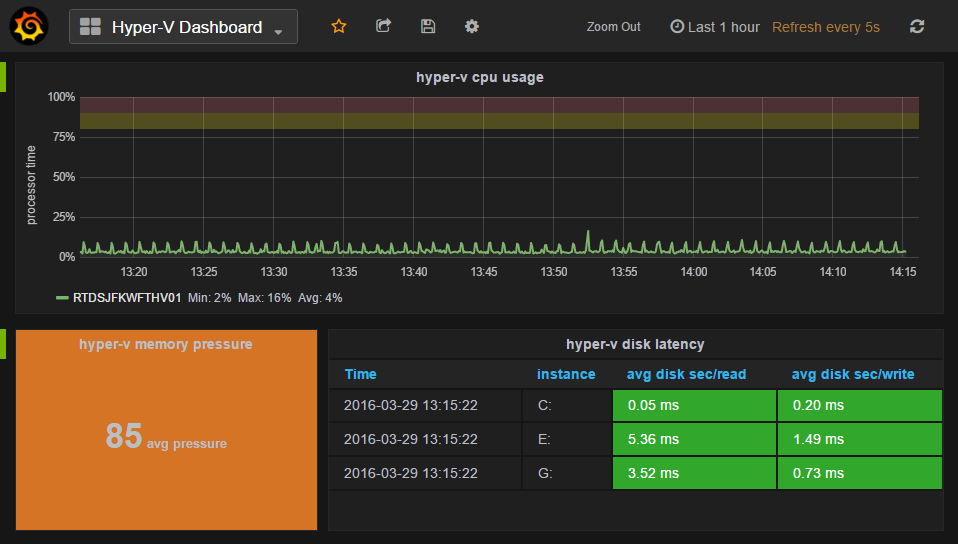
Using a combination of the open source tools InfluxDB to store the performance counter data, **Grafana **to graph the data and the Telegraf agent to collect Windows performance counters, you will be a master of your metrics in no time!
Read the detailed walk through over at hodgkins.io
In the past few weeks there has been a flurry of activity in the DuPSUG organization. We have been working on organizing the first PowerShell Saturday in the Netherlands and we recently also opened our doors on Slack, with our DuPSUG slack initiative.
On Slack we will provide a platform on which we will share our content and provide another platform for our members and PowerShell enthusiasts worldwide to interact with the Dutch scripting community. If you are interested in participating in our events, either as a participant or perhaps at future events as a speaker, fill please out the following form:
DuPSUG Slack Registration
After dealing with numerous problems from PenFlip (where our free ebooks are currently located), we’ve decided to try two new hosting providers: GitBook and LeanPub.
Both of these are, or can be, based on Git/GitHub, which means the Markdown text of the book will always be open-sourced and available. Both offer conversion into PDF, MOBI, and EPUB formats, so you can download whichever you want. Both enable us to update the books at any time. Both are relatively easy to use; GitBook provides a moderately better writing experience since they provide a native app that kind of hides the Git-i-ness, but it’s not a huge deal. More or less the same thing could be assembled for LeanPub if we wanted.
They do their formatting slightly differently, so it’s worth looking at each to see which you like better. We don’t have a ton of control over their formatting, so what you see in these tests is what you get.
LeanPub offers two key differences:
Join the Mississippi PowerShell User Group virtually on Tuesday, May 10th 2016 at 8:30pm Central Time when Microsoft MVP Steven Murawski will be presenting “Acceptance Testing Desired State Configuration with Test-Kitchen”.
DSC is awesome, but only if the resources and configurations do what you want them to do. How do you know? If you are relying on DSC to tell you when it didn’t do the right thing, you are in for a world of hurt. Configuration management is the world of “trust but verify” and Test-Kitchen gives you a common framework for testing your resources and configurations and use Pester to validate that your servers end up in the state you expect.
Visit the Mississippi PowerShell User Group website to learn more about Steven and to find out more details about this month’s meeting.
The Mississippi PowerShell User Group Meetings are held online (via Skype for Business) on the second Tuesday of each month at 8:30pm Central Time and are free to attend. The system requirements to attend these online meetings can be found on the MSPSUG website under the “Attendee Info” section.
Register via EventBrite to receive the URL for this meeting.
Note: It is not necessary to live in Mississippi or join our user group to attend our meetings or present a session for our user group.
µ

OK, we finally have a huge batch of PowerShell.org and DevOpsCollective.org laptop stickers! These are great, heavy-duty, removable stickers for laptop and every day use. Here’s how you can get yours - follow these instructions carefully!
United States
First, this offer is only valid until July 1st, 2016. After that, you’ll have to attend PowerShell + DevOps Global Summit, our Ignite “PowerShell Community Happy Hour” event, or someplace else where we’re in-person to get a sticker. Sorry for the deadline - I’m just not in the full-time sticker distribution business.
To get your sticker, send a business-sized Self-Addressed, Stamped Envelope to Don Jones, 7582 Las Vegas Blvd S, Suite 503, Las Vegas NV 89123. The return envelope should include your address in both the “main” and “return address” positions.
Long has it been known how to easily document your PowerShell source code simply by embedding properly formatted documentation comments right along side your code, making maintenance relatively painless…

But if you advanced to writing your PowerShell cmdlets in C#, you have largely been on your own, either hand-crafting MAML files or using targeted MAML editors far removed from your source code. But not anymore. With the advent of Chris Lambrou’s open-source XmlDoc2CmdletDoc, the world has been righted upon its axis once more: it allows instrumenting your C# source with doc-comments just like any other C# source:

All of the above provides fuel for Get-Help, i.e. providing help one cmdlet at a time. But we are a civilized people; we also need a web-based version of our full custom PowerShell API. That is, a hierarchical and indexed set of Get-Help pages for all the cmdlets in our module. For this task, my own open-source effort, DocTreeGenerator, nicely fills the gap, requiring very little beyond the doc-comments described above to do the complete job.
I have written extensively on using both XmlDoc2CmdletDoc and DocTreeGenerator, and just this week, released a one-page wallchart that shows how all the pieces work together:

Here’s the link to get you started on this fun journey:
Unified Approach to Generating Documentation for PowerShell Cmdlets
I love working in AD (Active Directory) with PowerShell. I find that I have had to really dig in to learn some of the syntax nuances that you need to understand to really mine data and change configurations within Active Directory. This puzzle reflects the kind of situation that people have to deal with in PowerShell everyday. I am interested to see what kinds of approaches each of you will take, this is a real chance to learn more of the diversity of methods that can be used in Active Directory with PowerShell.
This month Bartek Bielawski has submitted two puzzles, I am going to post the beginner to medium one first and then the advanced one next month. This is going to be a real learning opportunity. Keep the puzzles coming in, Mike F. Robbinson has submitted one recently too, so you can look forward to that in a couple of months.
Here we go:
During an internal IT audit of rights on your file server it was discovered that certain group had rights to the share used by finance and HR with sensitive data and the main question is: who was able to access these files because of that. When it happens you are attending a conference (surprise, surprise) and can’t really do anything remotely. That doesn’t stop your boss from calling you and asking for help. All she wants is a list of all users that are members of that group. The problem is that this group suffers from snow-ball effect and has multiple nested groups, that contain nested groups, that contain nested…
You respond with “use Get-ADGroupMember -Recursive” but your boss complains, that when she tried to use it, she just got some red text on her screen with information, that common delete is not recognized. You roll your eyes and eventually decide to write a short script and send it over e-mail. Luckily, you have sandbox domain controller running on your laptop, so testing your code is not that difficult. As you are in the middle of an interesting talk, you try to make it as simple and minimalistic as possible. You also decide not to try any other tools that require something to be installed on a computer running the code. One call from the boss is enough.
Design goals:
We’ve uploaded the results of the Verified Effective: PowerShell Toolmaker exam, which was administered at the recent PowerShell + DevOps Global Summit 2016. Note that this exam has, for a couple of years now, been available only as an on-site, in-person, proctored experience - we do not offer online delivery.
We had our best pass rate ever - about 20%. That said, nobody hit 100%. I had actually done a pre-con, full-day session on the very topic being tested - writing advanced functions - and had more than a few folks tell me that the session wasn’t as “advanced” as they wanted. Notwithstanding, 80% of the people who took the test didn’t pass (and I wasn’t the one grading the tests, either, so it’s not just spite!). Unfortunately, a lot of us think we’re “advanced,” but in fact are missing a lot of details. In some cases, having reviewed the graded tests, folks are missing some of the basics.
If you took the test, head over to VerifiedEffective.org and enter your candidate ID to see if you passed. I want to stress that I personally don’t have access to the graded tests with names attached - I only have anonymized copies.
We’re not going to offer the exam again at Summit 2017. We’re considering making some schedule changes that won’t accommodate the time and space and personnel needed to administer the exam and - to be frank - I think education would benefit a lot of people more than a test. Whether we offer the test again in future years hasn’t yet been decided, although I’ll share our general feelings at the end of this article.
In fact, with that “education” in mind, I’m going to break a rule. I’m going to post the entire exam packet, exactly as it was given to the attendees who took the exam. I did something similar after PowerShell Summit Europe 2015, but this is the exact exam packet. Go ahead - give yourself an hour to finish the test, and then check back here. I’ll wait.
Exam
Trying to get your code to look good when reading it later can be tricky
For line breaks in function scripts, there are two out-of-the-box options:
First, you can break a line after the pipe key, which is an elegant and easy-to-read approach.
Second, you can arbitrarily break a line with a back tick mark, which you will find left of the number 1 on a standard US keyboard.
**It looks like this: ** But did you know that the back tick is a hack? The back tick means, “literally interpret the next character,” or also said, escape the following character.”
For example, you might want to literally reference a quotation mark “ in a path name, but because it’s inside “” for strings, you need to literally interpret it: “”PATH”” – it’s hard to see, but squint.
But here’s another takeaway: if you use the back tick to create a line break, make sure there’s no space after it; otherwise, the space – not the carriage return – will be the escaped, literal character!
So here’s are some examples of what works and what doesn’t:
First, no line breaks - works like a charm, but if we add a few more pipes and parameters this could get ugly.